

MagicAI Platform Management
Introduction
UnoPim v2.0.0 introduces a unified multi-platform AI provider architecture. Instead of individual service classes for each provider, a single LaravelAiAdapter bridges all supported AI providers through the laravel/ai ^0.3.2 SDK and the Prism library.
Credentials are now managed via a dedicated database table (magic_ai_platforms) with encrypted API key storage, replacing the previous configuration-file approach. Administrators can add, test, and switch between providers entirely from the admin panel.
Supported Providers
UnoPim ships with support for the following AI providers out of the box:
| Provider | Slug | Text Generation | Image Generation |
|---|---|---|---|
| OpenAI | openai | Yes | Yes |
| Anthropic | anthropic | Yes | No |
| Google Gemini | gemini | Yes | Yes |
| Groq | groq | Yes | No |
| Ollama | ollama | Yes | No |
| xAI (Grok) | xai | Yes | Yes |
| Mistral | mistral | Yes | No |
| DeepSeek | deepseek | Yes | No |
| Azure OpenAI | azure | Yes | No |
| OpenRouter | openrouter | Yes | No |
| Custom (OpenAI-compatible) | custom | Yes | No |
TIP
Image generation is currently supported by OpenAI, Gemini, and xAI. Attempting to generate images with an unsupported provider will throw a RuntimeException.
Custom Provider (OpenAI-Compatible)
Added in v2.1.0
The Custom provider lets you connect any OpenAI-compatible AI service — such as Cerebras, Together, Fireworks, or a self-hosted gateway — without writing a new provider class.
When you select Custom (OpenAI-compatible) as the provider, the LaravelAiAdapter routes requests through Prism's Groq provider implementation. Groq's provider posts to the legacy /chat/completions endpoint, which is the de-facto standard that virtually every OpenAI-compatible third-party service implements. This means any service exposing a /chat/completions API will work without further code changes.
Configuring a Custom Provider
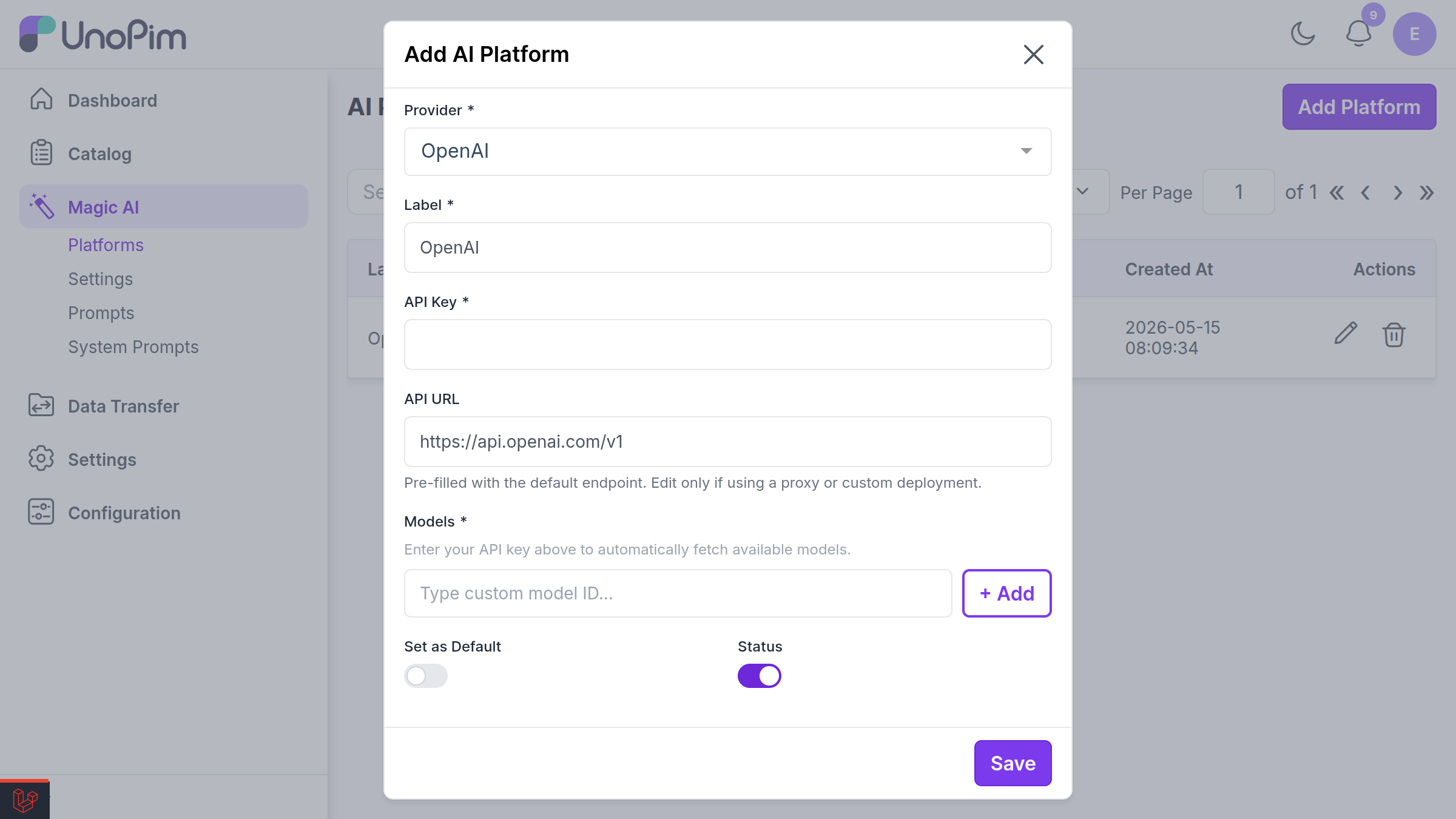
- From Platform Management, click Add Platform.
- Set Provider to Custom (OpenAI-compatible).
- Enter the service's API URL — this is required for the custom provider, since there is no default endpoint. Point it at the base URL of the OpenAI-compatible API (e.g.
https://api.together.xyz/v1). - Enter the API Key issued by your provider (stored encrypted).
- Add the Models you intend to use. Custom providers do not auto-discover models — the
fetchCustomModels()routine returns an empty list when the API does not expose a models endpoint, so enter the model identifiers manually as a comma-separated list. - Save the platform.
How the Custom Base URL Is Applied
At runtime, when a platform has an api_url set, the adapter dynamically overrides the base URL for both the Laravel AI SDK and Prism:
config(["ai.providers.{$configKey}.url" => $this->platform->api_url]);This keeps the custom endpoint scoped to the request and avoids any global configuration or .env changes.
WARNING
The custom provider is text-only — supportsImages() returns false for the custom slug. Use OpenAI, Gemini, or xAI for image generation.
Architecture Changes from v1.0.x
Before (v1.0.x)
In v1.0.x, each AI provider had its own service class:
Webkul\MagicAI\Services\OpenAI
Webkul\MagicAI\Services\Gemini
Webkul\MagicAI\Services\Groq
Webkul\MagicAI\Services\Ollama
Provider credentials were stored in Laravel config files, and switching providers required code or .env changes.
After (v2.0.0)
All provider logic is consolidated into a single adapter:
Webkul\MagicAI\Services\LaravelAiAdapterThis adapter:
- Implements the
Webkul\MagicAI\Contracts\LLMModelInterfacecontract. - Uses Prism (
echolabsdev/prism) for text generation with full control over temperature, max tokens, and system prompts. - Uses Laravel AI SDK (
laravel/ai)Image::of()for image generation. - Reads credentials from the
magic_ai_platformsdatabase table at runtime.
Key Components
| Component | Namespace / Location |
|---|---|
| Adapter service | Webkul\MagicAI\Services\LaravelAiAdapter |
| Contract interface | Webkul\MagicAI\Contracts\LLMModelInterface |
| Provider enum | Webkul\MagicAI\Enums\AiProvider |
| Platform model | Webkul\MagicAI\Models\MagicAIPlatform |
| Platform repository | Webkul\MagicAI\Repository\MagicAIPlatformRepository |
| Model recommender | Webkul\MagicAI\Support\ModelRecommender |
| Admin controller | Webkul\Admin\Http\Controllers\MagicAI\MagicAIPlatformController |
| DataGrid | Webkul\Admin\DataGrids\MagicAI\MagicAIPlatformDataGrid |
Database Schema
The magic_ai_platforms table stores provider configurations:
| Column | Type | Description |
|---|---|---|
id | bigint (PK) | Auto-incrementing identifier |
label | string | Human-readable name (e.g., "Production OpenAI") |
provider | string(50) | Provider slug (e.g., openai, anthropic) |
api_url | string(500) | Custom API endpoint URL (nullable) |
api_key | text | API key, stored with Laravel's encrypted cast |
models | text | Comma-separated list of model identifiers |
extras | json | Additional provider-specific configuration (nullable) |
is_default | boolean | Whether this is the default platform |
status | boolean | Whether the platform is active |
created_at | timestamp | Creation timestamp |
updated_at | timestamp | Last update timestamp |
WARNING
The api_key column uses Laravel's encrypted cast, meaning values are automatically encrypted at rest and decrypted when accessed. The key is also hidden from JSON serialization via the model's $hidden property.
Configuration via Admin Panel
Navigate to Configuration > MagicAI > Platform Management in the admin panel.
Adding a Platform
- Click Add Platform.
- Fill in the required fields:
- Label -- A descriptive name for this configuration.
- Provider -- Select from the dropdown (OpenAI, Anthropic, Gemini, etc.).
- API Key -- Your provider API key (stored encrypted).
- API URL -- Override the default endpoint if needed (useful for Azure or self-hosted Ollama).
- Models -- Comma-separated model identifiers (e.g.,
gpt-4o, gpt-4o-mini). - Extras -- Optional JSON for provider-specific settings.
- Toggle Status to enable the platform.
- Toggle Set as Default to make it the primary platform for AI operations.
Fetching Available Models
Click Fetch Models to query the provider's API for all available models. The results are passed through the ModelRecommender, whose recommend() method strips out model families that are not useful for chat or image generation — embeddings, speech, moderation, legacy completion bases, and dated snapshots — and returns the rest as suggested options for the Models field. If filtering removes everything, the original list is returned unchanged so the field is never empty.
TIP
The Custom (OpenAI-compatible) provider does not support model discovery — Fetch Models returns an empty list when the API has no models endpoint. Enter the model identifiers manually instead.
Setting a Default Platform
Only one platform can be the default at a time. When a new platform is set as default, all other platforms are automatically unset. The default platform is used for all MagicAI operations (content generation, translation, etc.).
Features
Text Generation
The adapter uses Prism directly for text generation, providing:
- Configurable temperature (0.0 -- 1.0)
- Configurable max tokens (automatically increased for reasoning models like o1, o3)
- Optional system prompt for context setting
- 120-second timeout for long-running requests
Image Generation
Image generation uses Laravel AI SDK's Image::of() API with support for:
- Size mapping:
1024x1024(1:1),1024x1792(2:3),1792x1024(3:2) - Quality levels:
standard(medium) andhd(high) - Returns base64-encoded data URIs
AI Content Generation
MagicAI generates product content including:
- Product descriptions and short descriptions
- SEO meta titles and descriptions
- Feature bullet points
- Custom prompt-based content
Product Value Translation
Use AI to translate product attribute values across locales. The system sends the source text with a translation prompt and writes the result back to the target locale.
Migration Guide
Updating Custom Code
If you previously used the individual provider service classes, you must update your code to use the unified adapter.
Before (v1.0.x):
use Webkul\MagicAI\Services\OpenAI;

$service = new OpenAI();
$response = $service->ask('Generate a product description for...');
After (v2.0.0):
use Webkul\MagicAI\Models\MagicAIPlatform;
use Webkul\MagicAI\Services\LaravelAiAdapter;

// Fetch the default platform
$platform = MagicAIPlatform::default()->active()->firstOrFail();

$adapter = new LaravelAiAdapter(
    platform: $platform,
    model: $platform->model_list[0],    // First model from the platform
    prompt: 'Generate a product description for...',
    temperature: 0.7,
    maxTokens: 1054,
    systemPrompt: 'You are a product copywriter.',
);

$response = $adapter->ask();
Generating Images (v2.0.0)
$adapter = new LaravelAiAdapter(
    platform: $platform,
    model: 'gpt-image-1',
    prompt: 'A professional product photo of a leather handbag',
);

$images = $adapter->images([
    'size'    => '1024x1024',
    'quality' => 'hd',
]);

// $images[0]['url'] contains a base64 data URI
Database Migration
The migration 2026_03_20_000001_create_magic_ai_platforms_table creates the new table. A companion migration 2026_03_20_000002_migrate_magic_ai_config_to_platforms automatically migrates existing configuration-based credentials into the new database table.
Run the standard migration command:
php artisan migrateThe LLMModelInterface Contract
All AI adapter implementations must satisfy the LLMModelInterface contract:
namespace Webkul\MagicAI\Contracts;

interface LLMModelInterface
{
    public function ask(): string;

    public function images(array $options): array;
}ask()-- Sends the prompt to the provider and returns the generated text.images(array $options)-- Generates images and returns an array of['url' => '...']entries.
The AiProvider Enum
The Webkul\MagicAI\Enums\AiProvider backed enum provides utility methods for each provider:
| Method | Description |
|---|---|
label() | Human-readable provider name |
configKey() | Laravel config key for the provider |
defaultUrl() | Default API base URL |
supportsImages() | Whether the provider supports image generation |
toPrismProvider() | Maps to Prism\Prism\Enums\Provider |
toLab() | Maps to Laravel\Ai\Enums\Lab |
fetchModels() | Fetches available models from the provider API |
options() | Returns an array suitable for dropdown menus |
Troubleshooting
| Symptom | Cause | Fix |
|---|---|---|
| "Provider does not support image generation" | Using Anthropic, Groq, Custom, etc. for images | Switch to OpenAI, Gemini, or xAI |
| Connection test times out | Network or incorrect API URL | Verify api_url and network access |
| Invalid model names error | Model string contains invalid characters | Use alphanumeric names with hyphens, dots, colons, or slashes |
| Encrypted key read error | APP_KEY changed after platform was saved | Re-enter the API key and save again |
| Custom provider request fails with a 404 | The API URL does not point at the base of an OpenAI-compatible API | Set API URL to the base path that exposes /chat/completions (e.g. https://api.together.xyz/v1) |
| Fetch Models returns nothing for a Custom provider | The custom API does not expose a models endpoint | Enter the model identifiers manually in the Models field |