

Webhooks
Introduction
UnoPim v2.1.0 introduces a Webhook system that lets you push product data to an external HTTP endpoint whenever products are created or updated. This allows third-party systems -- storefronts, ERPs, search indexes, or middleware -- to stay in sync with your catalog in near real time, without polling the UnoPim API.
The feature is provided by the Webkul\Webhook package (packages/Webkul/Webhook). It ships with an admin configuration screen, delivery logs, event listeners, and an asynchronous queued dispatch pipeline so that webhook delivery never blocks the admin request.
What Triggers a Webhook
The package registers listeners against the catalog product events in Webkul\Webhook\Providers\EventServiceProvider:
| Event | Listener method | Webhook event sent |
|---|---|---|
catalog.product.create.after | Product@afterCreate | product.created |
catalog.product.update.after | Product@afterUpdate | product.updated |
catalog.product.bulk.edit.after | Product@afterBulkEdit | product.updated (batch) |
data_transfer.imports.batch.product.save.after | Product@afterBulkUpdate | product.updated (batch) |
Before any of these listeners do work, they check SettingsRepository::isWebhookActive(). If the webhook is not enabled in the admin panel, the listener returns immediately and nothing is dispatched.
For single create/update events, the listener also runs change detection via WebhookService::getProductChangesForWebhook(). If no meaningful change is detected (for example an update with an empty audit diff), the webhook is skipped. Bulk-edit delivery (afterBulkEdit) skips change detection and sends every affected product.
Configuring Webhooks in the Admin Panel
Webhook settings are managed under Configuration -> Webhooks in the admin panel. The screen is rendered by WebhookSettingsController@index.
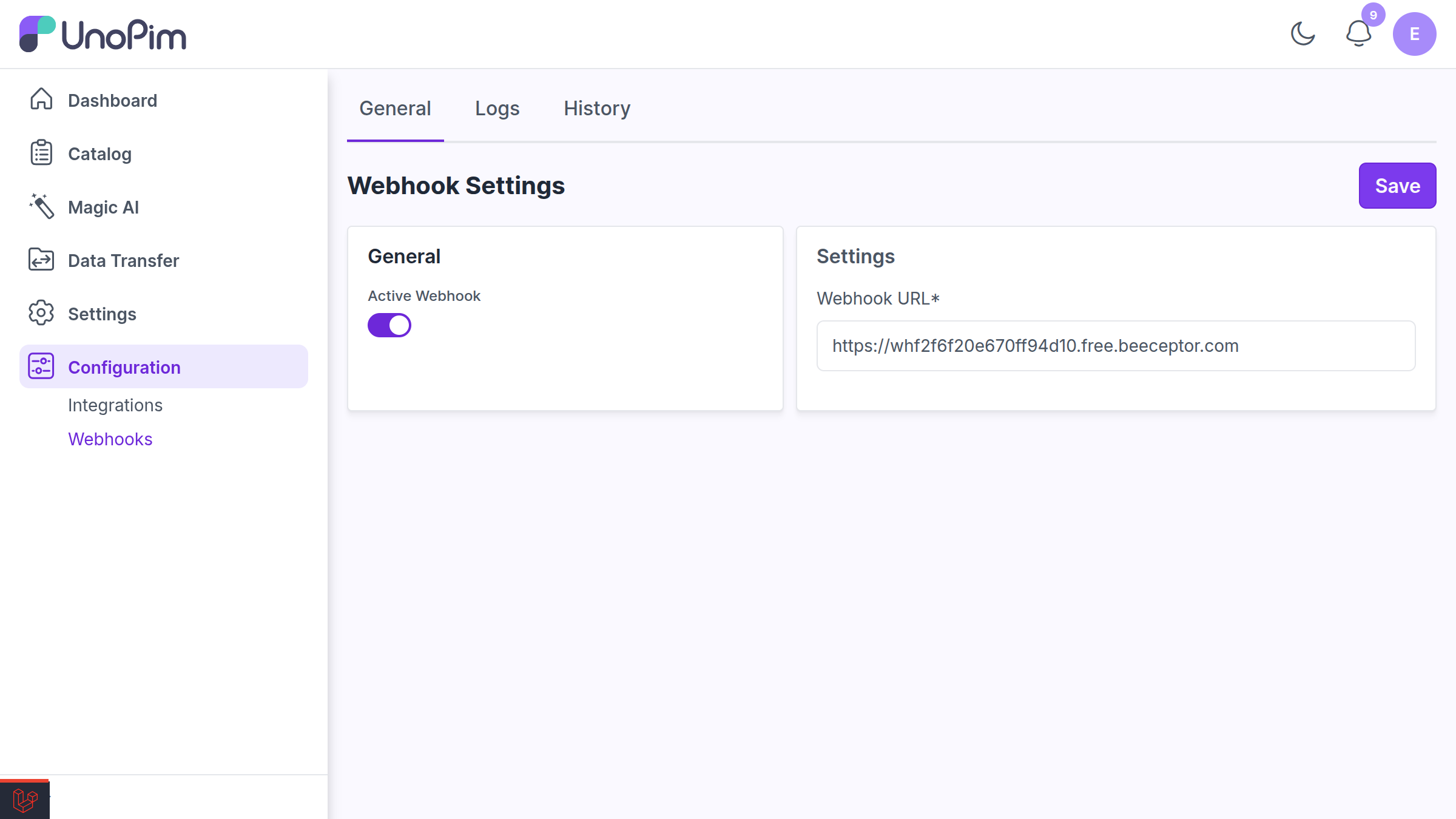
The settings form exposes two fields:
- Active Webhook -- A toggle that enables or disables webhook delivery globally.
- Webhook URL -- The external HTTPS endpoint that will receive the payload.
On save (WebhookSettingsController@store) the URL is validated with Laravel's url rule, and both values are persisted to the webhook_settings table through SettingsRepository::createOrUpdate(). Settings are stored as field/value rows:
field | Description |
|---|---|
webhook_active | 1 when delivery is enabled, 0 otherwise |
webhook_url | The destination endpoint URL |
Saving settings also dispatches the core.model.proxy.sync.webhookSettings event so the change is recorded in history (the WebhookSetting model implements HistoryAuditable).
Routes
The package registers its admin routes in packages/Webkul/Webhook/src/Routes/web.php, all under the admin middleware and the webhook prefix:
| Route name | Method / URI | Purpose |
|---|---|---|
webhook.settings.index | GET /webhook/settings | Settings screen |
webhook.settings.store | POST /webhook/settings | Save settings |
webhook.settings.get | GET /webhook/settings/form-data | Fetch current settings as JSON |
webhook.logs.index | GET /webhook/logs | Webhook logs DataGrid |
webhook.logs.delete | DELETE /webhook/logs/delete/{id} | Delete a single log |
webhook.logs.mass_delete | POST /webhook/logs/mass-delete | Mass-delete logs |
Asynchronous Dispatch
Webhook delivery is offloaded to queued jobs so the admin request returns immediately.
SendProductWebhook Job
For single product create/update events, the Product listener dispatches the Webkul\Webhook\Jobs\SendProductWebhook job onto the dedicated webhooks queue:
SendProductWebhook::dispatch($product->id, $changes, 'created', auth('admin')?->user()?->id)
    ->onQueue('webhooks');
The job constructor receives the product ID, the detected change diff, the event type (created or updated), and the acting admin's user ID. The job is configured for resilient delivery:
public int $tries   = 3;   // retry up to 3 times on failure
public int $backoff = 30;  // wait 30 seconds between attempts
When the job runs, it re-loads the product, re-authenticates the original admin (so the log records the correct user), and calls the matching WebhookService method:
match ($this->eventType) {
    'created' => $webhookService->sendCreatedToWebhook($product, $this->changes),
    'updated' => $webhookService->sendDataToWebhook($product, $this->changes),
    default   => null,
};
SendBulkProductWebhook Job
When products are updated through a data-transfer import batch, the afterBulkUpdate listener dispatches Webkul\Webhook\Jobs\SendBulkProductWebhook with the list of affected product IDs. The job re-authenticates the user and calls WebhookService::sendBatchByIds(), which sends all changed products in a single batch payload.
TIP
Because webhooks use the dedicated webhooks queue, make sure a queue worker is processing it, for example:
php artisan queue:work --queue=webhooksSee the Queue Management documentation for configuring workers.
Webhook Payload
Payloads are built and delivered by Webkul\Webhook\Services\WebhookService. The destination URL receives an HTTP POST request.
For a single product create/update, the body looks like:
{
    "event": "product.created",
    "timestamp": "2026-05-15 10:24:31",
    "user_timezone": "UTC",
    "data": [
        {
            "id": 42,
            "status": true,
            "sku": "tshirt-red",
            "type": "simple",
            "changes": {
                "added": {},
                "removed": {},
                "changed": {}
            }
        }
    ]
}
Key fields:
event--product.createdorproduct.updated.timestamp-- Server time the payload was generated.user_timezone-- Timezone of the acting admin (falls back toconfig('app.timezone')).data-- An array of normalized product objects.
Each normalized product object contains its id, status, sku, type, and a changes diff. For configurable products, a variants array is also included, listing each variant's sku and status.
The changes Diff
The changes object is produced by Webkul\Webhook\Helpers\ProductComparer, which compares the old and new values from the product's latest audit record. It returns a structured diff with three keys -- added, removed, and changed -- covering:
commonattribute valueslocale_specific,channel_specific, andchannel_locale_specificvaluesassociationscategoriesstatuschanges (enable/disable)
For created events, the diff's added section is supplemented with the product's sku, type, and status.
Webhook Logs
Every delivery attempt -- successful or failed -- is recorded in the webhook_logs table via LogsRepository. Logs are viewable in the admin panel under the Webhook screen's Logs tab, rendered by WebhookLogsController and the LogsDataGrid.
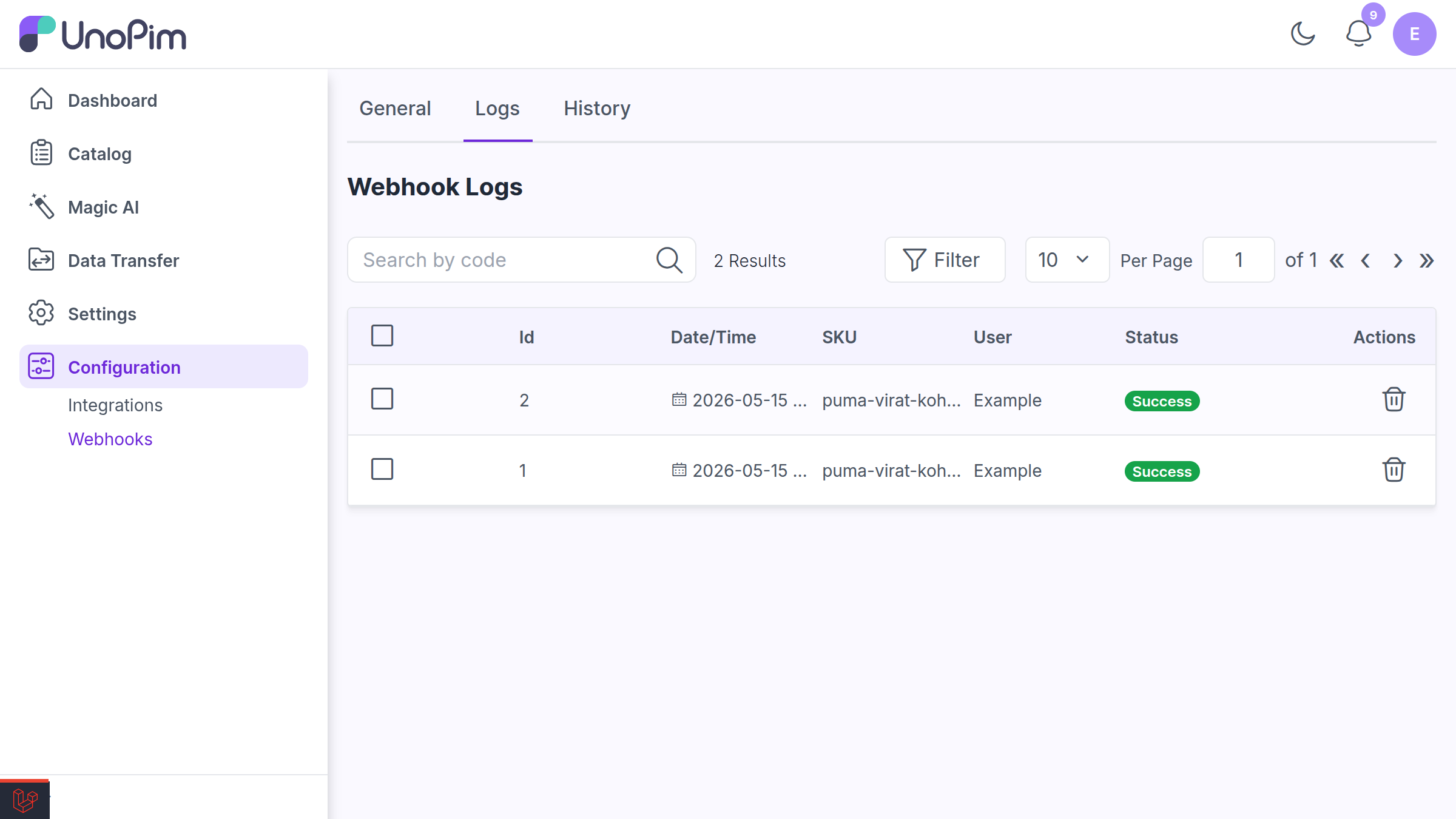
The DataGrid shows the log Id, product SKU, Date/Time, the User who triggered it, and the delivery Status (Success or Failed). Logs can be deleted individually or via mass action.
webhook_logs Table
| Column | Type | Description |
|---|---|---|
id | bigint | Primary key |
sku | string | SKU of the product the webhook was sent for |
user | string (nullable) | Name of the admin who triggered the webhook |
status | boolean | 1 for a successful response, 0 for failure |
extra | json (nullable) | The normalized response (HTTP status and body, or error details) |
created_at / updated_at | timestamp | Standard timestamps |
WARNING
The user column is nullable as of UnoPim v2.1.0 (migration 2026_05_12_120000_make_user_nullable_on_webhook_logs). This allows webhook logs to be recorded for deliveries that have no associated admin user, such as those triggered by background import batches.
The extra column stores a normalized representation of the HTTP response so failures can be diagnosed:
- For a real HTTP response:
{ "status": <http_status>, "body": "<response_body>" } - For a thrown exception:
{ "status": <code>, "error": "<message>" }
webhook_settings Table
| Column | Type | Description |
|---|---|---|
id | bigint | Primary key |
field | string | Setting key (webhook_active, webhook_url) |
value | string (nullable) | Setting value |
extra | json (nullable) | Reserved for additional metadata |
created_at / updated_at | timestamp | Standard timestamps |
ACL Permissions
The Webhook package defines its ACL entries in packages/Webkul/Webhook/src/Config/acl.php. Assign these permissions to roles to control who can view and manage webhooks:
| ACL key | Grants access to |
|---|---|
configuration.webhook | The Webhook section as a whole |
configuration.webhook.settings | Viewing webhook settings |
configuration.webhook.settings.update | Saving/updating webhook settings |
configuration.webhook.logs | Viewing webhook logs |
configuration.webhook.logs.delete | Deleting a single log entry |
configuration.webhook.logs.mass_delete | Mass-deleting log entries |
The settings and logs views are gated by these permissions, so a role without configuration.webhook.logs will not see the Logs tab.
Extending the Webhook System
The webhook system is built on UnoPim's standard event/listener architecture, so you can hook into or extend it without modifying the package.
Listening to Webhook-Related Events
The package itself listens for catalog product events. If you build a custom module, you can register additional listeners against the same events, or react to the webhook settings sync event:
use Illuminate\Support\Facades\Event;

// React when webhook settings are saved
Event::listen('core.model.proxy.sync.webhookSettings', function ($payload) {
    // $payload['old_values'], $payload['new_values'], $payload['model']
});
Triggering Webhooks Programmatically
You can send products to the configured webhook directly through WebhookService:
use Webkul\Webhook\Services\WebhookService;

$webhookService = app(WebhookService::class);

// Send a single product (created event)
$webhookService->sendCreatedToWebhook($product, $changes);

// Send a single product (updated event)
$webhookService->sendDataToWebhook($product, $changes);

// Send a batch of products by ID or SKU
$webhookService->sendBatchByIds([1, 2, 3]);
$webhookService->sendBatchBySkus(['sku-1', 'sku-2']);
To dispatch delivery asynchronously, queue the job instead:
use Webkul\Webhook\Jobs\SendProductWebhook;

SendProductWebhook::dispatch($productId, $changes, 'updated', auth('admin')?->user()?->id)
    ->onQueue('webhooks');
TIP
WebhookService reads the destination URL from settings and silently returns null when no webhook_url is configured, so it is safe to call even when webhooks are not yet set up.
Key Files
| File | Purpose |
|---|---|
packages/Webkul/Webhook/src/Providers/EventServiceProvider.php | Registers product event listeners |
packages/Webkul/Webhook/src/Listeners/Product.php | Dispatches webhook jobs on product events |
packages/Webkul/Webhook/src/Jobs/SendProductWebhook.php | Queued job for single product delivery |
packages/Webkul/Webhook/src/Jobs/SendBulkProductWebhook.php | Queued job for batch delivery |
packages/Webkul/Webhook/src/Services/WebhookService.php | Builds payloads, sends requests, stores logs |
packages/Webkul/Webhook/src/Helpers/ProductComparer.php | Computes the product change diff |
packages/Webkul/Webhook/src/Models/WebhookSetting.php | webhook_settings model |
packages/Webkul/Webhook/src/Models/WebhookLog.php | webhook_logs model |
packages/Webkul/Webhook/src/Http/Controllers/WebhookSettingsController.php | Settings screen and save action |
packages/Webkul/Webhook/src/Http/Controllers/WebhookLogsController.php | Logs screen and delete actions |
packages/Webkul/Webhook/src/Config/acl.php | Webhook ACL permission definitions |
packages/Webkul/Webhook/src/Database/Migrations/ | Migrations for webhook_logs and webhook_settings |