

Digital Product Passport
Introduction
A Digital Product Passport (DPP) is a public, versioned record of a product — its identity, materials, documents and operator information — served at a stable URL that a QR code on the physical product can point to. UnoPim ships passports as a first-class publication type, so every passport you publish is immutable, auditable and tier-gated from the very first version.
The feature is built from two packages. Webkul\Publication is the generic publishing engine: it owns immutable versions, public routes, tiered access and data carriers. Webkul\ProductPassport is the DPP publication type that plugs into it, contributing templates, readiness checks and payload building. Because the engine knows nothing about passports specifically, other publication types can share the same lifecycle later.
Nothing about a passport's field list is hardcoded. A passport template is data — sections, fields, tiers and labels all live in the database and are edited from the admin panel. When a delegated act adds a field to a product group's passport, that change is a row in your database, not a software release.
Settings
Before you build your first template, you should know where the feature is switched on. Both settings groups live under Configuration → System Settings → Digital Product Passport, and every value is readable through core()->getConfigData().
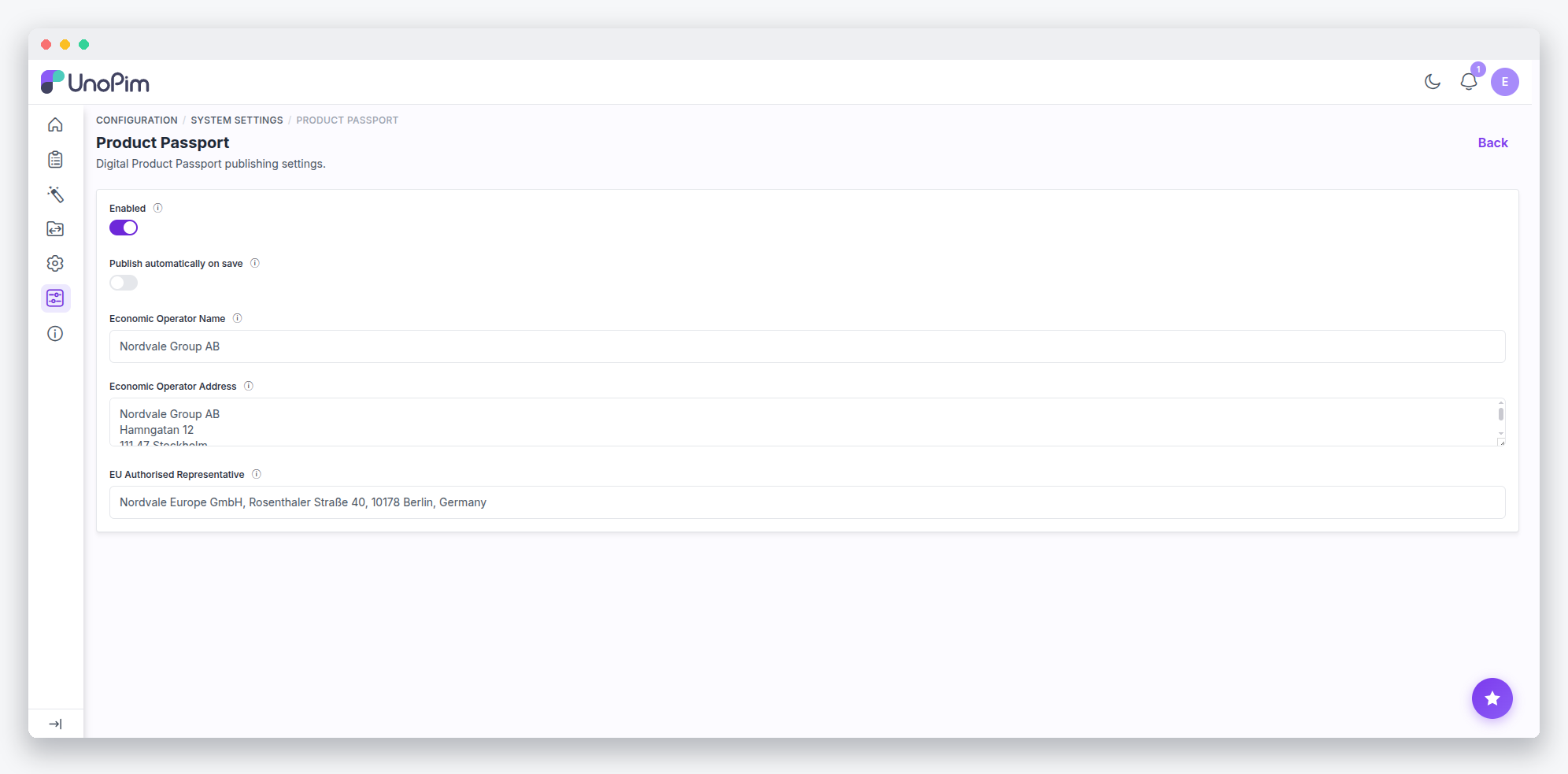
The following keys control the feature:
| Key | Effect |
|---|---|
catalog.product_passport.settings.enabled | Feature switch. When off, the Passports menu, grid and product panel are hidden and their routes return 404. Checked per channel by PassportFeature::enabledFor($channel). |
catalog.product_passport.settings.auto_publish | When on, Listeners\AutoPublishPassport (bound to catalog.product.create.after / catalog.product.update.after) queues a publish for every ready locale on each save. The job is ShouldBeUnique, so rapid re-saves de-dupe. |
catalog.product_passport.settings.operator_name / operator_address / operator_eu_rep | The ESPR economic-operator block printed on every public passport. |
general.publication.settings.enabled | Master switch for the public serving tier. Off ⇒ every public URL 404s; publishing is refused with a 422 while admin screens keep working. Read by PublicAccessGate::enabledForChannel(). |
general.publication.settings.base_url | Canonical origin for public URLs, QR carriers and GS1 links. Blank falls back to config('app.url'). |
general.publication.settings.cache_ttl / rate_limit / indexable | Shared-cache s-maxage, per-IP limiter, and the X-Robots-Tag index/noindex switch. |
general.publication.settings.gs1_passport_channel | Which channel /01/{gtin} resolves to when a product is published on several channels. |
A few switches are environment-only: PUBLICATION_ENABLED (a global kill switch ahead of routing), PUBLICATION_QUEUE (default publication), PUBLICATION_GLOBAL_RATE_LIMIT, and PUBLICATION_ASSET_DISK (default private).
Templates
A template describes everything a passport will publish: its sections, the fields inside them, which attribute each field reads, which access tier it belongs to, and whether it is required. You build and edit templates entirely from the admin panel.
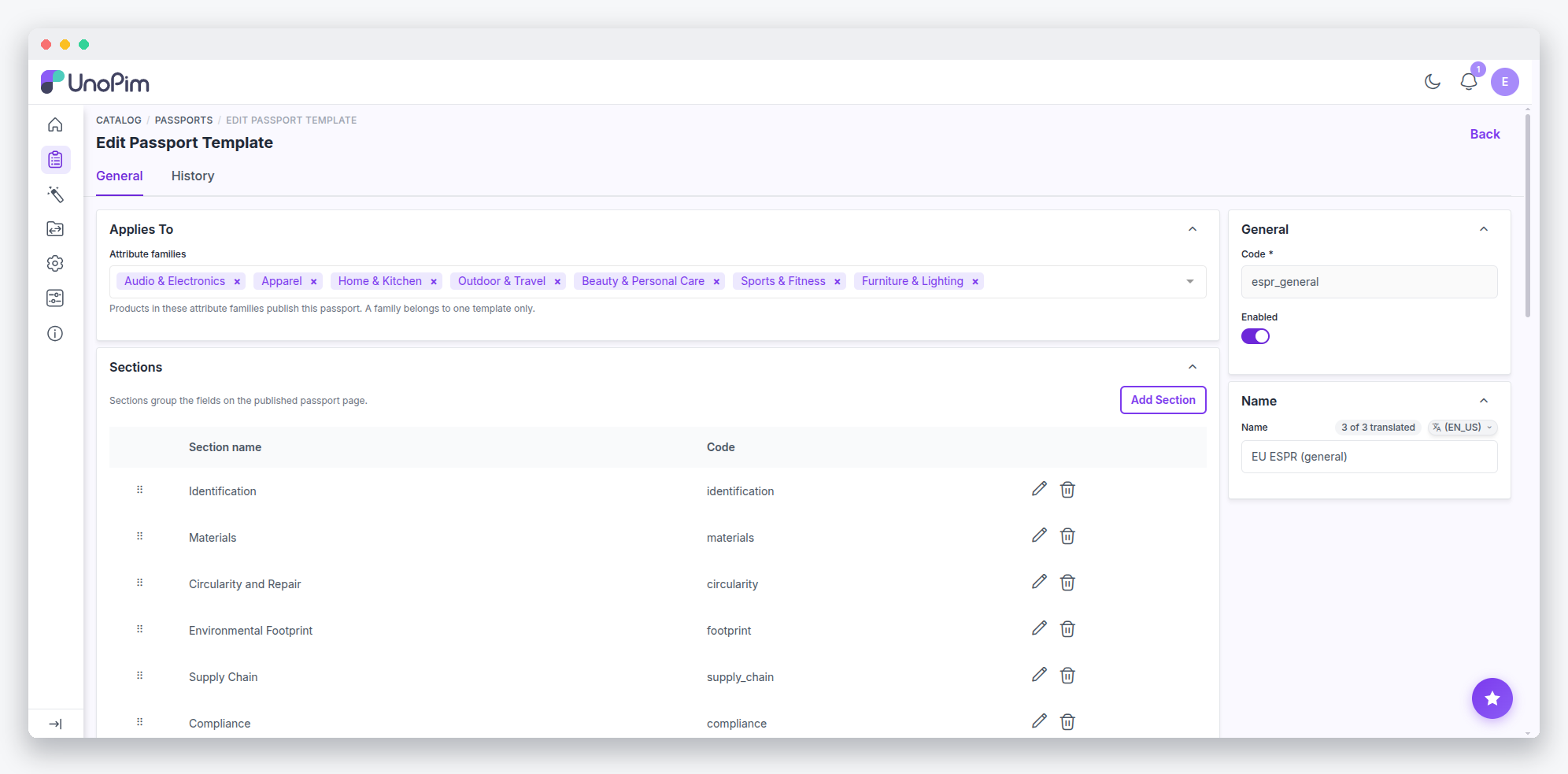
Each template is bound to one or more attribute families, and a family resolves to at most one template. That keeps "which passport does this product get" a single lookup with no precedence rules.
When you add a field, three properties shape how it behaves:
- Source (
PassportFieldSource) — anattributefield reads the product's value for the current channel and locale, while afixedfield publishes the field's own localizedfixed_value. A field with no attribute bound yet is a draft: it publishes nothing and counts as unsourced. - Tier (
PassportFieldTier) — one ofconsumer,operatororauthority. The tier list and its order are code-owned because signed-URL elevation depends on them; the per-field assignment is yours to edit. - Role (
PassportFieldRole) —gtin,modelorbatch. A role field feeds the identifier block and the data carrier instead of publishing a row, and each role is unique per template (fields without a role repeat freely).
Installing a Preset
You may install a ready-made template instead of building one field by field. Presets are shipped as configuration and materialized into ordinary, editable templates by PassportPresetSeeder:
php artisan unopim:passport:install-preset --preset=tyresThe command is idempotent — the seeder skips any template whose code already exists. A freshly installed preset is bound to no family and every field is left unsourced, so installing changes nothing until an admin wires it up.
Publishing from a Product
Once a product's family has an enabled template, a passport panel appears on the product edit page. The panel is injected via the unopim.admin.catalog.product.edit.form.links.after event from PassportPanelComposer, and it lists every channel locale with its current version, publish date and a Missing Fields count.
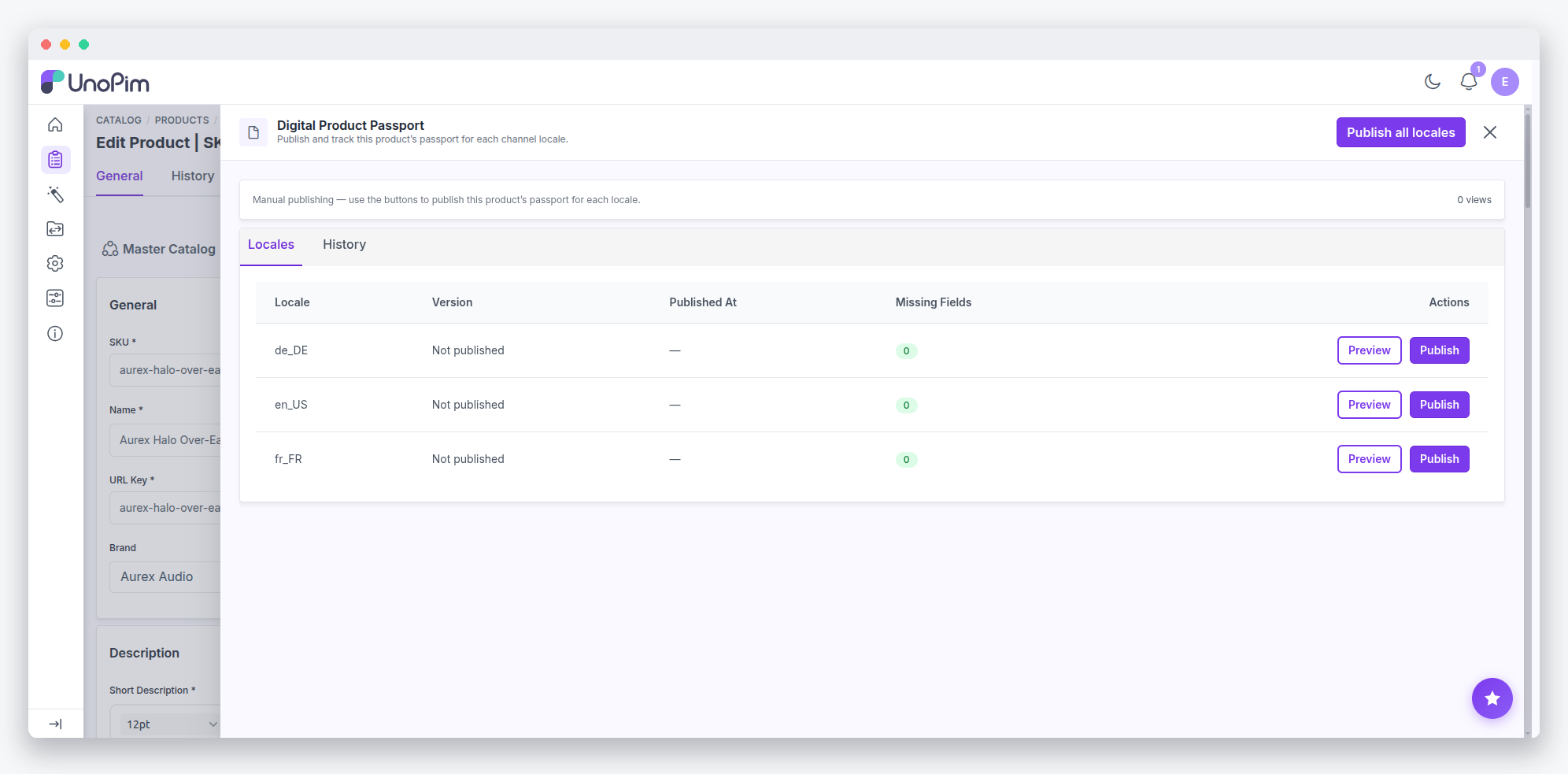
Readiness is computed by PassportReadinessService, whose missingFor(), isReady() and missingLabels() methods report the required fields that resolve empty for a channel and locale. A product whose family has no template is never ready. To help you close the gaps, each missing entry deep-links to the exact attribute (…/edit?channel=…&locale=…#attribute-{id}), and attributes required by the bound template are badged Required for DPP in the attribute groups.
The Preview action renders the public template from live data using PublicationContext(preview: true) — no version is minted, no URL is created and no analytics are recorded. Product saves also validate dpp_gtin with Gs1CheckDigit, which accepts lengths 8, 12, 13 and 14 and verifies the GS1 mod-10 check digit.
If you would rather not publish by hand at all, enable the auto_publish setting described above: UnoPim will automatically queue a publish for every ready locale each time the product is saved.
The Publish Lifecycle
Every passport moves through a small, deliberate state machine:
                 publish                    withdraw
   ┌─────────┐  (gate passes,  ┌───────────┐         ┌───────────┐
   │  draft  │───────────────▶ │ published │────────▶│ withdrawn │
   └─────────┘   new version)  └───────────┘         └───────────┘
                                  │    ▲    reinstate     │
                        publish / │    └──────────────────┘
                      re-publish  │
                     (new version │         redact (API only,
                      on changed  │         GDPR — one way)
                       checksum)  ▼               │
                               ┌──────────────────▼┐
                               │      redacted     │  payloads nulled,
                               └───────────────────┘  tombstone served
PublicationStatus moves draft → published ⇄ withdrawn, plus a one-way redacted. acceptsNewVersions() is true for Draft and Published only. Note that everything except Draft stays publicly resolvable — a withdrawn passport serves a tombstone, not a 404, because a 404 would deny the product ever had a passport.
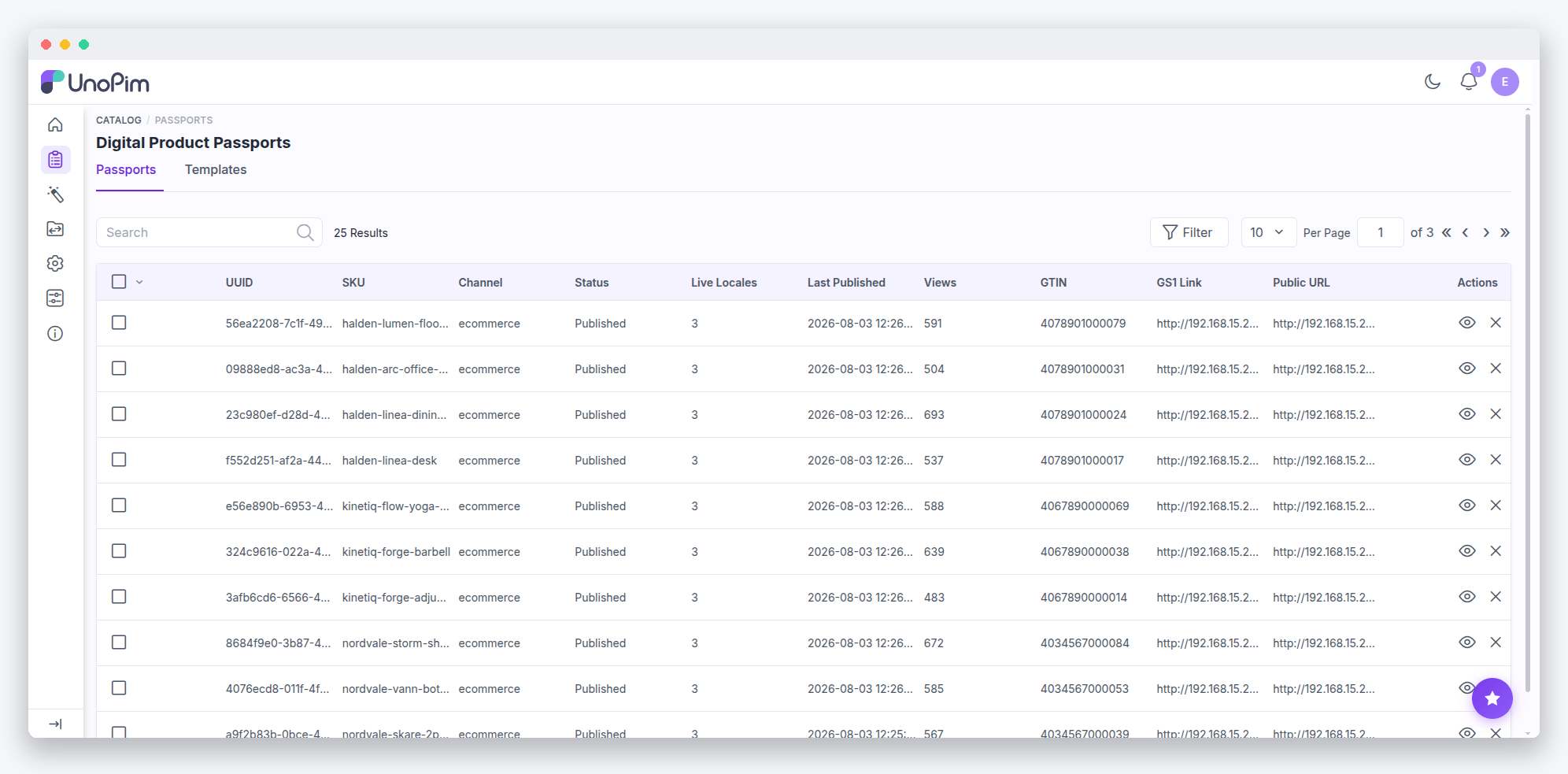
Each transition has a dedicated entry point with precise semantics:
| Action | Route / entry point | Semantics |
|---|---|---|
| Publish / re-publish | POST admin/catalog/passports/publish/{product} (channel_id, locale_ids[]) | Queues one PublishPassportForProductChannelJob; a version is minted per locale only when the canonicalized payload checksum changed. Previous current version is marked superseded. Fires PublicationPublished. |
| Withdraw | POST admin/catalog/passports/withdraw/{publication} | Published → Withdrawn. Versions untouched; documents stop being served. Fires PublicationWithdrawn. |
| Reinstate | POST admin/catalog/passports/reinstate/{publication} | Withdrawn → Published; every locale version becomes reachable again. Fires PublicationReinstated. |
| Version rollback | POST admin/catalog/passports/{publication}/versions/republish | Forward-only: the old payload is copied into a new current version (MAX(version)+1), so the audit trail never rewrites. |
| Redact | API only — POST /api/v1/passports/redact/{id} | GDPR erasure. Nulls every current payload with a recorded reason, flips the publication to Redacted, prunes document rows. Sticky and irreversible. |
Bulk operations (mass-publish, bulk-publish, mass-transition) run chunked on the publication queue. GuardProductDeletionAgainstPublications and GuardChannelDeletionAgainstPublications block deleting anything that still has published passports.
Public Pages, QR Codes and Access Tiers
A published passport is served on a small set of public routes:
| Route | Purpose |
|---|---|
/{prefix}/{uuid}/{locale} | The passport page. Returns JSON-LD instead when the request negotiates application/ld+json. |
/{prefix}/{uuid}/carrier | QR code as SVG. Extensionless on purpose — a .svg suffix is answered by nginx's static rules and never reaches PHP. carrier.svg remains as an alias. |
/{prefix}/{uuid}/asset/{path} | Published documents, tier-gated. |
/01/{gtin} | GS1 Digital Link resolution to the passport of the designated channel. |
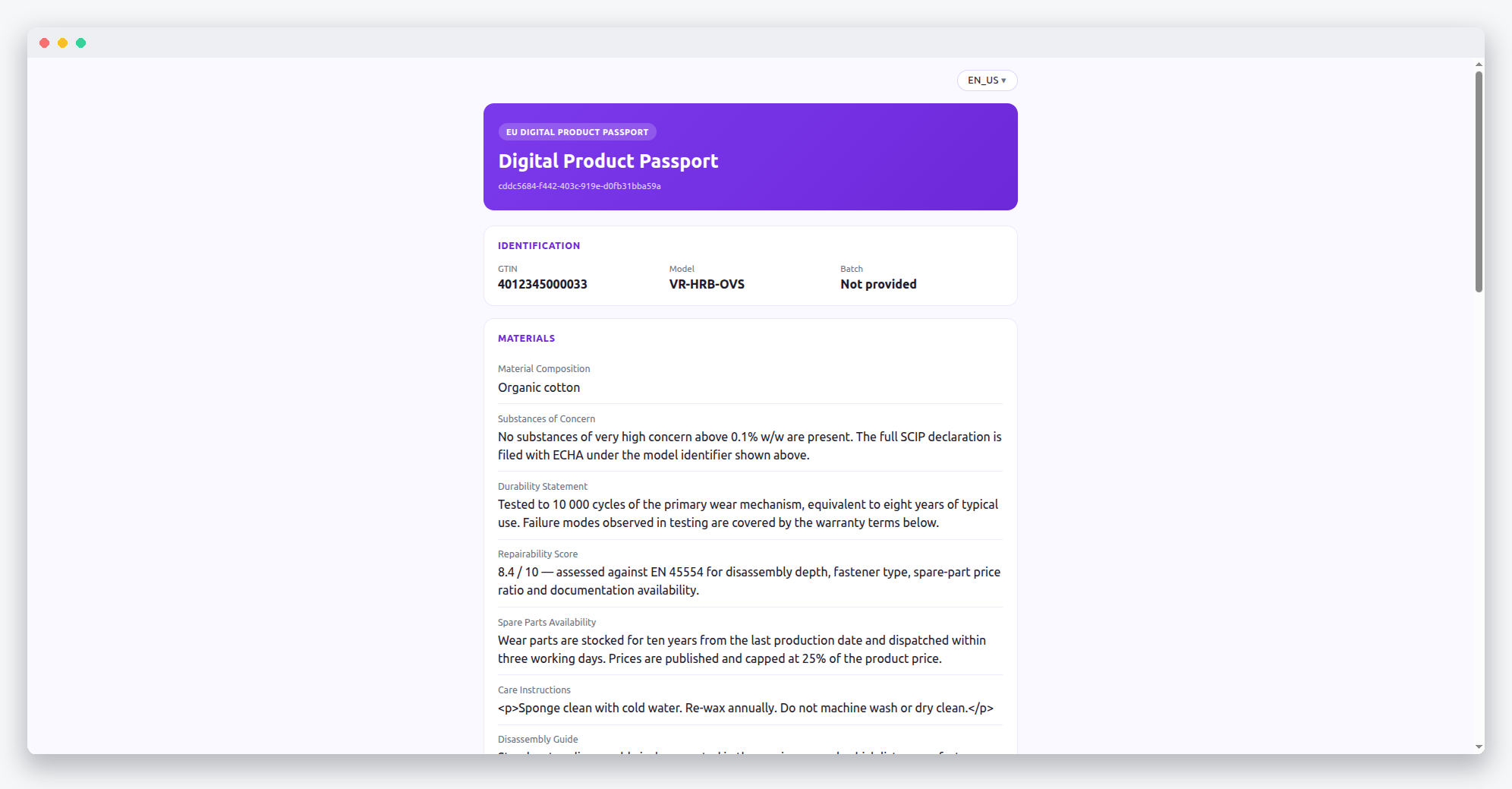
By default a visitor sees the consumer tier. Elevation to operator or authority requires a Laravel signed URL carrying a tier parameter; anything missing, tampered or unknown clamps back to consumer.
REST API
You may drive the entire passport lifecycle over the REST API. All endpoints require auth:api and return 404 when the feature is disabled:
| Method | Path | Purpose |
|---|---|---|
| GET | /api/v1/passports | Paginated list (sku, status, limit 1–100) |
| GET | /api/v1/passports/{sku} | All publications for one product |
| POST | /api/v1/passports/publish/{sku} | Queue publish (channel_id, locale_ids[]) — returns 202 |
| POST | /api/v1/passports/withdraw/{id} | Withdraw |
| POST | /api/v1/passports/reinstate/{id} | Reinstate |
| POST | /api/v1/passports/redact/{id} | GDPR redaction (reason required) |
Extension Points
The Publication Type Configuration
The publishing engine is type-driven. Publisher does not know what "complete" means for a passport — each publication type declares its own payload builder, template, route prefix, gate and JSON-LD resource, and the engine resolves them:
'types' => [
    'dpp' => [
        'payload_builder' => PassportPayloadBuilder::class,
        'template'        => 'passport::public.passport',
        'route_prefix'    => 'p',
        'gate'            => TemplateReadinessGate::class,
        'jsonld'          => PassportJsonLdResource::class,
    ],
],
A type without a gate publishes unconditionally, while a gate that is not a PublicationGate throws rather than being ignored. The interface is intentionally small:
interface PublicationGate
{
    public function passes(Product $product, Channel $channel, Locale $locale): bool;
}
The passport type ships TemplateReadinessGate, a PublicationGate implementation that fails closed.
Custom Presets
You may add a preset for your own product group by merging configuration into passport_presets, keyed by template code:
return [
    'tyres' => [
        'name_key'     => 'yourpackage::app.passport.tyres.name',
        'label_prefix' => 'yourpackage::app.passport.tyres.fields.',

        'sections' => [
            'identity' => 'yourpackage::app.passport.tyres.sections.identity',
        ],

        'fields' => [
            ['code' => 'tyre_id', 'section' => 'identity', 'role' => PassportFieldRole::Gtin, 'required' => true],
            ['code' => 'rolling_resistance', 'section' => 'identity'],
            ['code' => 'wet_grip', 'section' => 'identity', 'tier' => PassportFieldTier::Operator],
        ],
    ],
];
Field labels resolve from label_prefix . code and section names from their name_key, per enabled catalog locale — a catalogue with two locales gets two translation rows, not one per shipped language file.
Services, Events and ACL
The core services are container-resolved, so a package can decorate or rebind any of them. PassportTemplateResolver returns the enabled template bound to a product's family, with sections, fields, attributes and translations eager-loaded; it is memoized per family id, so a bulk publish of one family is a single query set without holding request state on the container. PassportReadinessService and PassportPayloadBuilder (which builds the published payload from the template) are likewise swappable, as is PassportPresetSeeder, which materializes a preset from config into an editable template, idempotently.
Beyond the services, you can hook into templates in the usual UnoPim ways:
catalog.passport_template.{create,update,delete}.{before,after}events fire around every template write.- Templates, sections and fields are audited through
HistoryTraitunder thepassport_templatetag. - ACL keys:
catalog.passport.template.{view,create,edit,delete}.
Internals
Data Model
Templates and their children are stored across a small set of tables:
passport_templates                     code (unique), is_enabled
passport_template_translations          name per locale
passport_template_families              attribute_family_id (unique across all templates)
passport_template_sections              code, position
passport_template_section_translations   name per locale
passport_template_fields                code, source_type, attribute_id, tier,
                                        is_required, role, position
passport_template_field_translations     label, fixed_value per locale
The "one template per family" rule described earlier is enforced at the database level by the unique index on attribute_family_id. On fields, attribute_id is nullable — that is what makes a draft field possible — and role is unique per template while NULL repeats freely.
Payload Shape
PassportPayloadBuilder produces the following structure for every version:
[
    'identifier' => ['gtin' => ..., 'model' => ..., 'batch' => ...],
    'operator'   => ['name' => ..., 'address' => ..., 'eu_representative' => ...],
    'sections'   => [['key' => 'materials', 'label' => 'Materials', 'fields' => [...]]],
    'documents'  => [...],
    'tiers'      => ['consumer' => ['fields' => [], 'documents' => []], 'operator' => ..., 'authority' => ...],
    'meta'       => ['uuid' => ..., 'url' => ..., 'locale' => ..., 'channel' => ..., 'built_at' => ..., 'template' => ...],
]
sections and documents carry the base tier only; tiers holds the full partition that signed elevation reads. meta is excluded from the checksum, so anything placed there never affects version dedupe.
Fields resolve in a fixed order: a role field goes to identifier; a fixed field publishes its localized value; an attribute field reads the product value for that channel and locale; a file or image attribute is copied to the asset disk and published as a document. An empty optional field is skipped, so no section renders as a bare heading.
Checksums, ETags and View Counting
Every public render carries an ETag derived from hash_hmac('sha256', checksum|status|locale|tier|templateVersion, app.key); an If-None-Match hit returns 304 and is never counted as a view. View analytics (RecordPublicationView) upsert one daily aggregate row per publication and locale — no IP, no visitor identity.
Postgres Payloads
publication_version_payloads.payload is gzip-compressed bytea. On Postgres the driver returns a stream, and reading it moves the pointer, so the accessor rewinds before reading and caches the decoded array per instance. Without that, the second consumer in one request — the published listener that syncs the GTIN, for example — sees an absent payload. MySQL returns a string and never exposes the fault.
Queue Requirement
WARNING
All publishing, bulk transitions and view counting run on the publication queue. A worker must be listening or nothing will ever publish:
php artisan queue:work --queue=publicationREST API
Passports are fully manageable over the REST API — list publications, read them per SKU, publish, withdraw, reinstate, and redact. See Digital Product Passports in the API reference.