

Measurements
Introduction
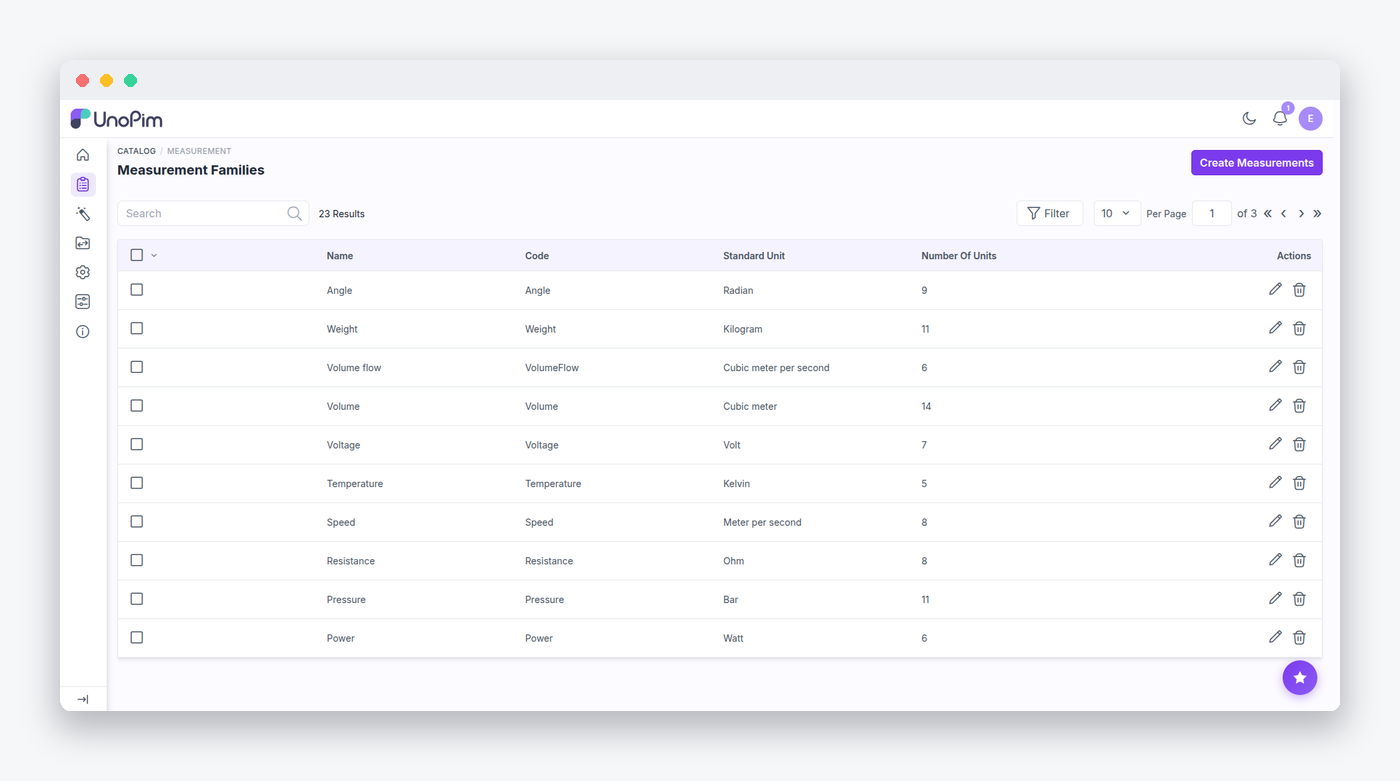
The Webkul\Measurement package adds a first-class measurement attribute type to UnoPim. A measurement value carries an amount and a unit, units belong to measurement families with conversion rules, and every stored value keeps a normalized base amount so filtering and comparison work across units.
Sometimes your catalog captures the same dimension in different units — one supplier ships lengths in centimetres, another in inches. Because every value is normalized to the family's standard unit, you may filter "length greater than 1 m" and match both without any per-query conversion.
Value Shape and Conversion
A stored measurement value looks like:
{
  "unit": "cm", "amount": "180.0000", "family": "Length",
  "base_unit": "m", "base_data": "1.800000", "symbol": "cm"
}
Webkul\Measurement\Helpers\MeasurementHelper is the engine behind this shape:
calculateBaseValue()applies a unit'sconvert_from_standardoperations in reverse with inverted operators (mul↔divide,add↔subtract) to normalize any unit to the family's standard unit. Up to 5 chained operations per unit are supported (mul,div,add,sub).applyPrecision()formats amounts using the configured decimals and strategy.resolveUnitCode()accepts a unit code, symbol, or any localized label (case- and whitespace-normalized) — so imports stay forgiving.
Attribute Integration
The type registers itself by merging the attribute_types config (measurement). The package integrates with the rest of the platform by container rebinding — a useful pattern for extension authors:
- A
MeasurementNormalizeris added toAttributeNormalizerFactory. - The DataTransfer
FieldProcessor, the productImporter/Exporter, andProductAttributeValuesNormalizerare swapped for measurement-aware subclasses. - Database and Elasticsearch product filters are registered through the
unopim.database.attribute.filters/unopim.elasticsearch.attribute.filterscontainer tags. - Listeners on
catalog.attribute.update.before/.aftervalidate and persist the attribute's family/unit binding, while view-render events inject the family picker into the attribute form and the unit selector into the product form.
Configuring Precision
You may tune how amounts are rounded under Configuration → System Settings → Measurement (the system.measurement config group). The strategy setting defaults to round, which uses number_format; choosing trim instead truncates on the decimal string, avoiding binary floating-point artifacts like 0.29 × 100 = 28.999…. The amount setting (default 4) controls the decimals for the entered amount, and base (default 6) controls the decimals for the normalized base value — both accept 0–10.
Recalculating Base Values
When a family's conversions or the precision settings change, stored base values go stale. You may rebuild them with a single command:
php artisan measurement:recalculate [--family=Length] [--chunk=200] [--dry-run]The command walks every value scope (common, locale_specific, channel_specific, channel_locale_specific), rebuilds each measurement value, and writes with saveQuietly() — no observers fire, so it never cascades into webhooks or search indexing.
Validation Limits
MeasurementFamilyValidator and MeasurementUnitValidator enforce sensible ceilings: at most 300 families, 100 units per family, and 5 conversions per unit. Codes must match ^[A-Za-z0-9_]+$, and labels must contain at least one letter.
Data Model
For reference, the underlying tables are:
measurement_families              code (unique), name, standard_unit, symbol
measurement_family_translations   label per locale
measurement_units                 family FK, code, symbol, position   (unique per family)
measurement_unit_translations     label per locale
measurement_unit_conversions      unit FK, operator, value, position
attribute_measurement             attribute_id, family_code, unit_code
MeasurementFamily exposes a virtual legacy shape over the normalized tables: assigning labels or units arrays on the model upserts or replaces the translation, unit, and conversion rows on save, and the units accessor rebuilds the legacy array. The repositories are MeasurementFamilyRepository and AttributeMeasurementRepository.
Admin Routes
Admin routes live under admin/measurement (ACL catalog.measurements.*): family CRUD plus mass delete (admin.measurement.families.*), unit CRUD per family (admin.measurement.families.units.*), and JSON helpers for attribute wiring (measurement.attribute, admin.measurement.family.units, admin.measurement.attribute.units).
REST API
The API shares the v1/rest prefix and middleware with the Admin API:
| Method | Path | Purpose |
|---|---|---|
| GET/POST | /api/v1/rest/measurement | List / create families |
| GET/PUT/DELETE | /api/v1/rest/measurement/{code} | Read / update / delete a family |
| GET/POST | /api/v1/rest/units/{familyCode} | List / create units |
| GET/PUT/DELETE | /api/v1/rest/units/{familyCode}/{code} | Read / update / delete a unit |
| GET | /api/v1/rest/attribute-measurement/config/{attributeCode} | An attribute's family/unit binding |
| GET | /api/v1/rest/attribute-measurement/{familyCode} | Units of a family |
| POST/PUT | /api/v1/rest/attribute-measurement/{attributeCode} | Bind / update an attribute's measurement config |
API ACL keys: api.catalog.measurements[.create|.edit|.delete] and api.catalog.measurements.units[.create|.edit|.delete].