

Webhooks
Introduction
Webhooks let UnoPim push product data to your external HTTP endpoints the moment products change, so your storefronts, ERPs, and middleware stay in sync without polling the API. Instead of asking "has anything changed?" every few minutes, your systems simply wait for UnoPim to tell them.
As of v3.0, the single-webhook configuration has grown into a full multi-webhook module (Webkul\Webhook). You may register any number of endpoints, and each one carries its own event subscriptions, an optional HMAC signing secret, custom headers, and scoped delivery logs. For example, you might point one webhook at your Shopify middleware for product.updated events while a second webhook notifies your ERP whenever a product is created.
If you are upgrading from v2.x, your existing webhook settings are migrated automatically — the legacy URL becomes the first webhooks row, subscribed to both product events, and your old logs are attached to it.
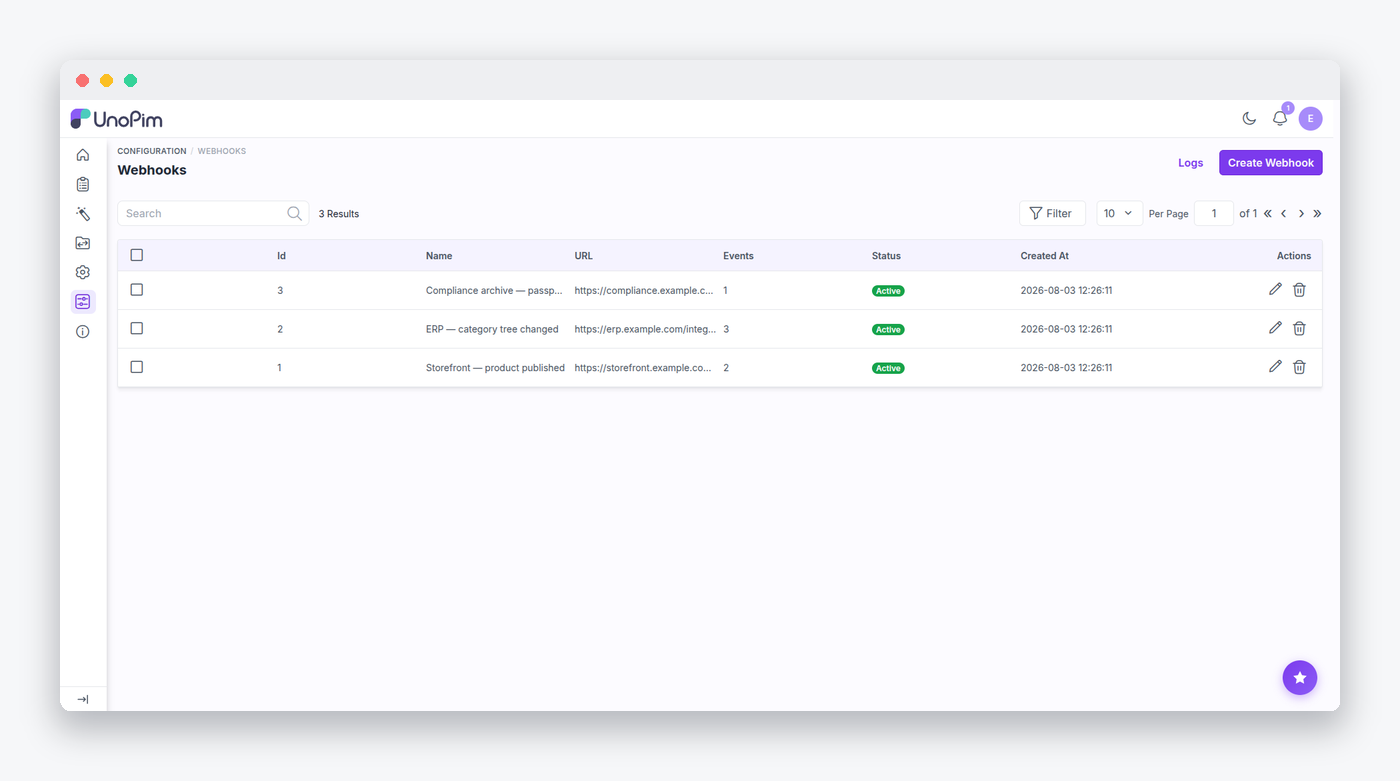
Managing Webhooks in the Admin
You may manage webhooks from Configuration → Webhook. The routes live under admin/configuration/webhook (named webhook.*) and provide the full CRUD, mass delete, and a Test action that POSTs a webhook.test payload to your endpoint with a 10-second timeout, so you can confirm connectivity before going live.
Delivery logs have their own routes (webhook.logs.* — list, per-webhook scope, detail, delete, and mass delete). Access is gated by the ACL keys configuration.webhook[.create|.edit|.delete] and configuration.webhook.logs[.view|.delete|.mass_delete].
How Delivery Works
Deliveries run asynchronously on the webhooks queue. Single changes are dispatched via SendProductWebhook ($tries = 3, $backoff = 30), while bulk operations use SendBulkProductWebhook and SendBulkEditProductWebhook. Batches are chunked at 100 products per request, so even large imports produce a manageable stream of calls.
Each request carries a set of headers, built by WebhookService::buildHeaders():
X-Unopim-Event:      product.updated
X-Unopim-Webhook-Id: 42
X-Unopim-Signature:  sha256=<hmac>        # only when a secret is set
...plus any custom headers configured on the webhook
A single-event payload looks like this:
{
  "event": "product.updated",
  "timestamp": "2026-08-04 10:00:00",
  "user_timezone": "Asia/Kolkata",
  "data": [
    { "id": 1, "status": true, "sku": "shirt-1", "type": "simple",
      "changes": { "added": {}, "removed": {}, "changed": {} } }
  ]
}
Configurable products additionally carry variants: [{sku, status}]. UnoPim detects changes by diffing the latest audit record via ProductComparer, and it will automatically skip delivery when nothing meaningful changed.
Verifying Signatures
When you configure a secret on a webhook, UnoPim signs every request so your receiver can be sure the payload really came from your PIM. The signature is hash_hmac('sha256', $exactJsonBody, $secret) computed over the exact body sent — you should verify it before trusting a payload.
Leaving the secret field blank when updating a webhook never wipes an existing secret, so you may safely edit other fields without re-entering it.
SSRF Protection
Because webhook URLs are user-supplied, every URL passes through Webkul\Webhook\Validators\SafeWebhookUrl at both save time and delivery time. Only http/https schemes are allowed, the hostname is DNS-resolved, private, reserved, link-local, and multicast addresses are rejected, redirects are disabled, and the connection is pinned to the validated IP (CURLOPT_RESOLVE) to defeat DNS rebinding.
Sometimes during local development you may wish to deliver to a loopback target. This is an explicit opt-in:
WEBHOOK_ALLOW_LOOPBACK=truePruning Delivery Logs
Delivery logs accumulate quickly on a busy catalog, so UnoPim ships a pruning command:
php artisan webhook:logs:prune [--days=30]This deletes delivery logs older than the retention window (WEBHOOK_LOG_RETENTION_DAYS, default 30; setting it to 0 disables pruning). The package's service provider schedules the command to run daily, so you rarely need to invoke it by hand.
Registering Custom Events
The event catalog is a container singleton, Webkul\Webhook\Registry\EventRegistry, seeded from the webhook.events config. If your package wants to expose its own webhook events, you may register them either through the facade or by merging config:
// In your service provider's boot():
use Webkul\Webhook\Facades\WebhookEvent;

WebhookEvent::register('order', [
    'order.created' => 'shop::app.webhook-events.order.created',
]);

// Or merge config: return ['events' => ['order' => [...]]];
$this->mergeConfigFrom(__DIR__.'/../Config/webhook.php', 'webhook');
The admin form's event multiselect, the in: validation rule, and the log columns will automatically pick up your new keys. Your package then dispatches delivery itself — typically a listener that queues a job calling WebhookRepository::getActiveForEvent($key) and WebhookService-style delivery.
Upgrading From the Single Webhook
The v3.0 migration reads the legacy webhook_settings rows, creates a webhooks row from the configured URL (subscribed to product.created + product.updated, with the active flag preserved), and re-parents orphaned logs. The migration is idempotent, and rolling back removes only the seeded row.
Removed classes
WebhookSettingsController and the old SettingsRepository no longer exist. Extensions must use WebhookRepository and the webhooks model.
Data Model
Two tables back the module:
webhooks       name, url, is_active, events (json), secret, headers (json), extra
webhook_logs   webhook_id (nullOnDelete), sku, event, user, status, http_code, extra
The model excludes secret from audit history ($auditExclude), and delivery logs are indexed on [webhook_id, created_at] and [status, created_at] to keep the log grids fast.
Webkul\Webhook\Repositories\WebhookRepository is the query surface you should build against:
$repository->getActiveForEvent('product.updated'); // is_active + whereJsonContains('events', ...)
$repository->hasActiveForEvent('product.created');
Built-In Events
Out of the box, UnoPim ships two webhook events, product.created and product.updated, fired from the following platform events:
| Platform event | Webhook event |
|---|---|
catalog.product.create.after | product.created |
catalog.product.update.after | product.updated |
catalog.product.bulk.edit.after | product.updated (batch) |
data_transfer.imports.batch.product.created.after | product.created (batch) |
data_transfer.imports.batch.product.updated.after | product.updated (batch) |