

Configurable Associations
Introduction
Product associations let you link products to one another — a camera to its lenses, a jacket to the trousers that complete the outfit. UnoPim ships with three built-in association types: Related Products, Up Sells, and Cross Sells. Starting with UnoPim 3.0, you are no longer limited to these three: you may define your own association types, each with localized names and custom per-link fields.
Sometimes you may wish to capture more than the link itself. For example, a "spare parts" association might need a per-link quantity, or a "replaced by" association might need a localized note explaining the replacement. Configurable associations make both possible without touching a line of schema.
The feature lives in the Webkul\Product package (schema, models, repositories, validators), with its admin UI in Webkul\Admin and import/export jobs in Webkul\DataTransfer.
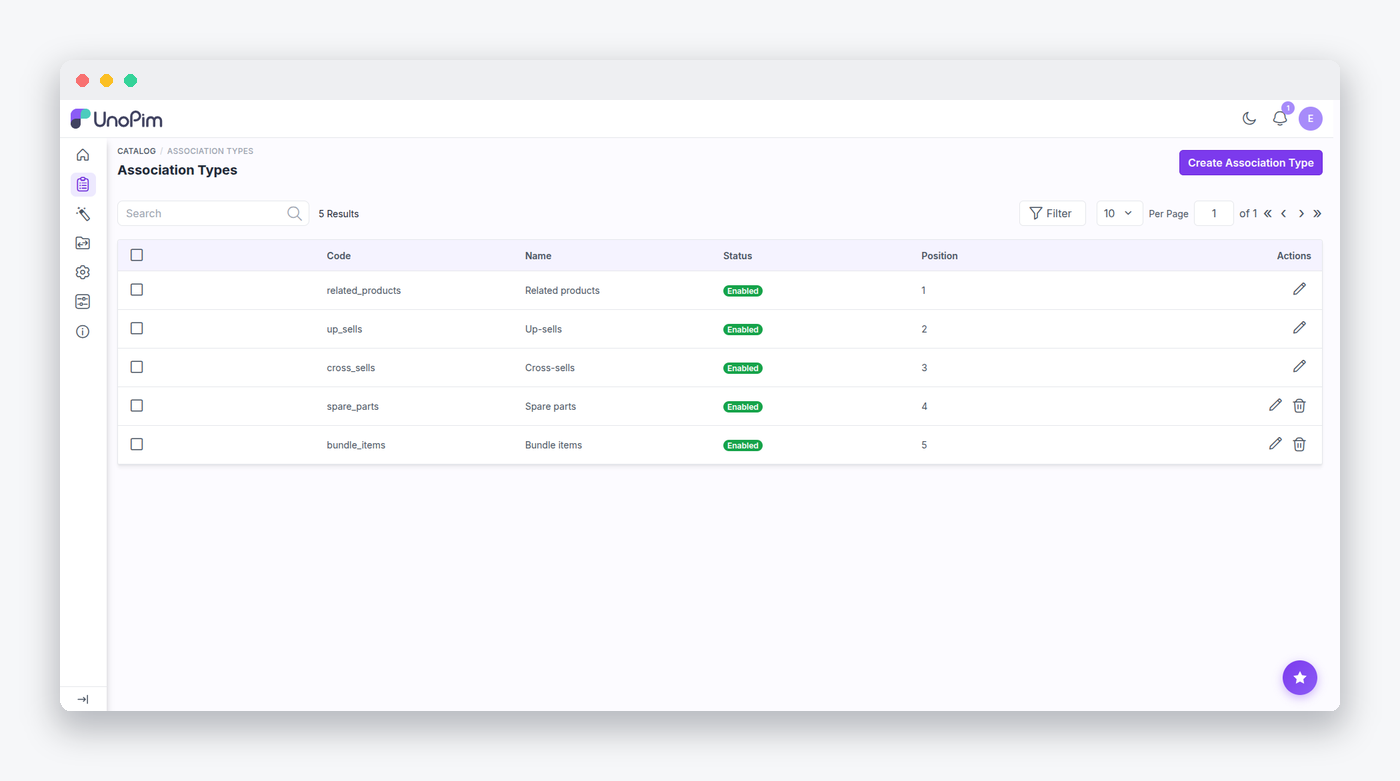
Defining Association Types
You may manage association types from the admin panel under Catalog → Association Types. Each type has a unique code, localized names, a status, and a position that controls its ordering in the product form.
The seeder creates the three default types — related_products, up_sells, and cross_sells — with is_user_defined = 0, and the controller protects them from accidental changes:
store()forcesis_user_defined = 1, so only the seeder may create defaults.destroy()returns HTTP 400 for a non-user-defined type, whilemassDestroy()silently skips them.update()stripscodeandis_user_definedfrom the payload — both are immutable on every type.
Custom Link Fields
You may attach custom fields to any association type; the values are captured per link when a user edits a product's associations. Field definitions hang off the type in association_type_fields, and the allowed field types come from the association_field_types config file (packages/Webkul/Product/src/Config/association_field_types.php) — currently text and boolean. The storage, validation, and rendering layers already understand richer types, which is why this config file is the single place to widen the list.
Per-link values are stored in the additional_data JSON column of product_associations:
{
  "common":          { "<field_code>": "value" },
  "locale_specific": { "en_US": { "<field_code>": "value" } }
}
A field with value_per_locale = 1 reads and writes the locale_specific.<locale> bucket, as resolved by AssociationTypeField::getJsonPath(); otherwise the value lives in common.
Before any link is persisted, its custom-field data is validated by the association validator:
Webkul\Product\Validator\AssociationValidator::validate(int $associationTypeId, array $additionalData, ?int $ignoreId = null, bool $skipLocaleSpecific = false): void;Unknown field codes are rejected, and each field type contributes its own rules — booleans via BooleanString, dates via date_format, and options via FieldOption.
Retrieving and Syncing Links
When working with associations in code, you should go through the repositories rather than querying tables directly:
use Webkul\Product\Repositories\AssociationTypeRepository;
use Webkul\Product\Repositories\ProductAssociationRepository;
To retrieve the enabled types ordered by position — with translations, fields, and options eager-loaded — call AssociationTypeRepository::getActiveTypes(). A single type may be looked up with findByCode(string $code).
For links themselves, ProductAssociationRepository::getLinksForProduct(int $productId) returns all of a product's links with the type and related product eager-loaded. To replace a type's links transactionally, use syncType():
$associationRepository->syncType($productId, $typeId, [
    ['related_product_id' => 42, 'position' => 1, 'additional_data' => null],
]);
The link shape everywhere is ['related_product_id' => int, 'position' => ?int, 'additional_data' => ?array]. syncType() fires the sync events, while the single-row upsertLink() / deleteLink() methods used by imports intentionally fire no events.
Type updates resolve field rows by code rather than by the browser's isNew flag, so a resubmitted form stays idempotent.
Legacy JSON Compatibility
Before 3.0, associations lived as SKU lists inside products.values['associations']. That shape still works — Webkul\Product\Type\AbstractType keeps both stores in sync:
syncAssociationLinks()mirrors the legacy JSON SKU lists intoproduct_associationson every product save, withpreserveAdditionalData: true, so a plain save never wipes custom field values.prepareRichAssociations()/syncRichAssociations()handle the rich UI/API payload: validation happens before the product saves, and syncing happens after, per type, with the payload authoritative.- A one-time migration (
backfill_product_associations) streamed existing catalogs into the new table using chunkedinsertOrIgnore— idempotent and non-destructive.
WARNING
Extensions should read associations from product_associations (or the product API's associations block), not from the raw JSON. The JSON mirror only covers the three legacy sections.
REST API
There is no dedicated association endpoint. Instead, associations ride on the product endpoints:
- Read — single-product GET responses include an
associationsblock grouped by type code, each entry shaped as{"related_sku": ..., "additional_data": {...}}. The legacyvalues.associations.<section>output is unchanged. - Write — product create and update payloads accept the same
associationsstructure; the controllers validate custom-field data before persisting and sync after.
Import and Export
Both jobs use the type key product-associations. Import rows carry sku, association_type, related_sku, plus one column per active field code, and delete mode is supported via the sample variants. The importer uses upsertLink / deleteLink, so it accumulates links and never prunes ones it did not touch. The export job streams from ProductAssociationRepository to CSV, XLS, or XLSX.
Regular product imports and exports also carry the legacy association sections.
Data Model
For reference, the underlying tables are:
association_types                         code (unique), status, position, is_user_defined
association_type_translations             name per locale
association_type_fields                   code, type, validation, position, is_required,
                                          is_unique, status, section, value_per_locale,
                                          enable_wysiwyg, regex_pattern
association_type_field_translations       name per locale
association_type_field_options            code, sort_order
association_type_field_option_translations  label per locale

product_associations                      product_id, association_type_id,
                                          related_product_id, position,
                                          additional_data (json)
A link is unique per (product_id, association_type_id, related_product_id). Both product foreign keys cascade, so deleting a product removes its links in both directions.
Admin Routes and Validation
Routes live under admin/catalog/association-types (admin.catalog.association_types.*): index, search, store, edit, update, delete, mass-delete, and mass-update. ACL keys are catalog.association_types plus .create, .edit, .delete, .mass_update, and .mass_delete.
Validation is handled by Webkul\Admin\Http\Requests\AssociationTypeRequest — type codes must pass Webkul\Core\Rules\Code, reserved field codes (code, type, locale) are rejected, and duplicate field codes within a type fail with a dedicated message.
Events
UnoPim will automatically fire the following events, which you may listen for in your own packages:
| Event | Fired |
|---|---|
catalog.association_type.create.before / .after | Type creation |
catalog.association_type.update.before / .after | Type update and mass update |
catalog.association_type.delete.before / .after | Type delete and mass delete |
product_association.sync.before / .after | Every link sync ([$productId, $typeId, $links]) |
Types and their fields are audited through HistoryTrait under the association_type history tag.